 NiceLook.net
AI jewelry product photos: a clean white background and a styled scene
To get jewelry product photos on a white background with AI, upload your picture to NiceLook's Product photo module and ask for a pure white background with a soft shadow. The 100 free sign-up credits (no credit card) cover 5 images at 1K; after that, an image costs 20 credits at 1K or 40 at 2K and 4K, with packs from €4.99 for 500 credits and no subscription.
100 free credits (5 images) · no subscription · packs from €4.99
Before and after: a silver and garnet ring
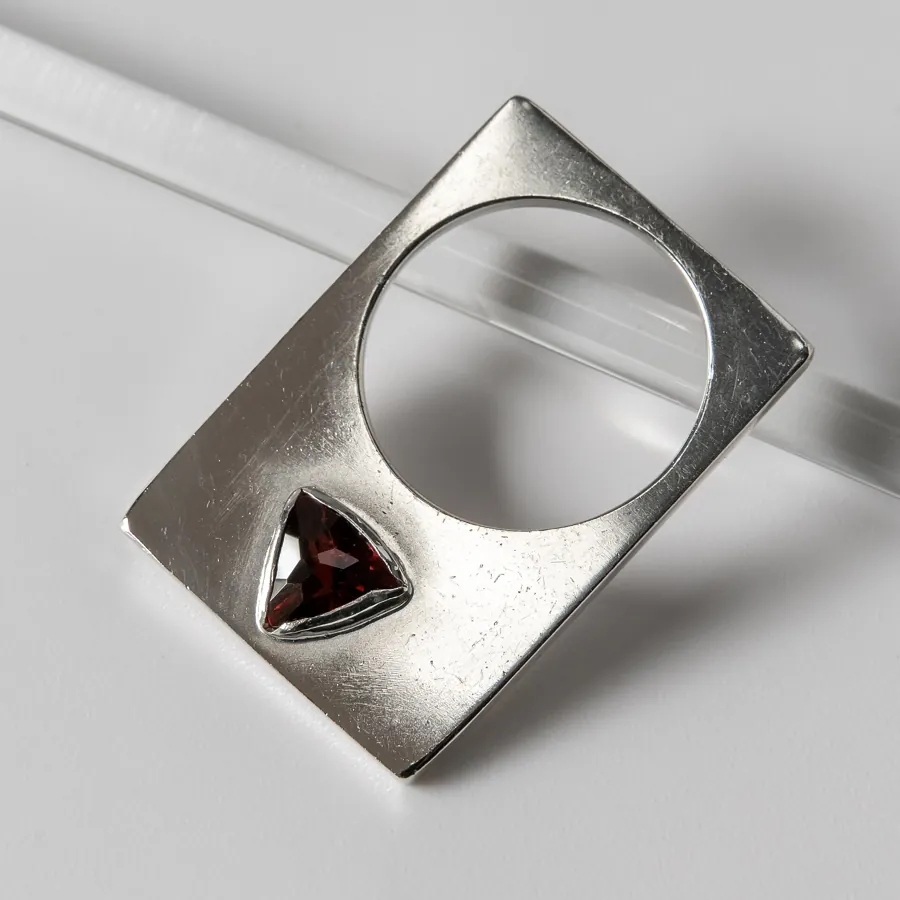
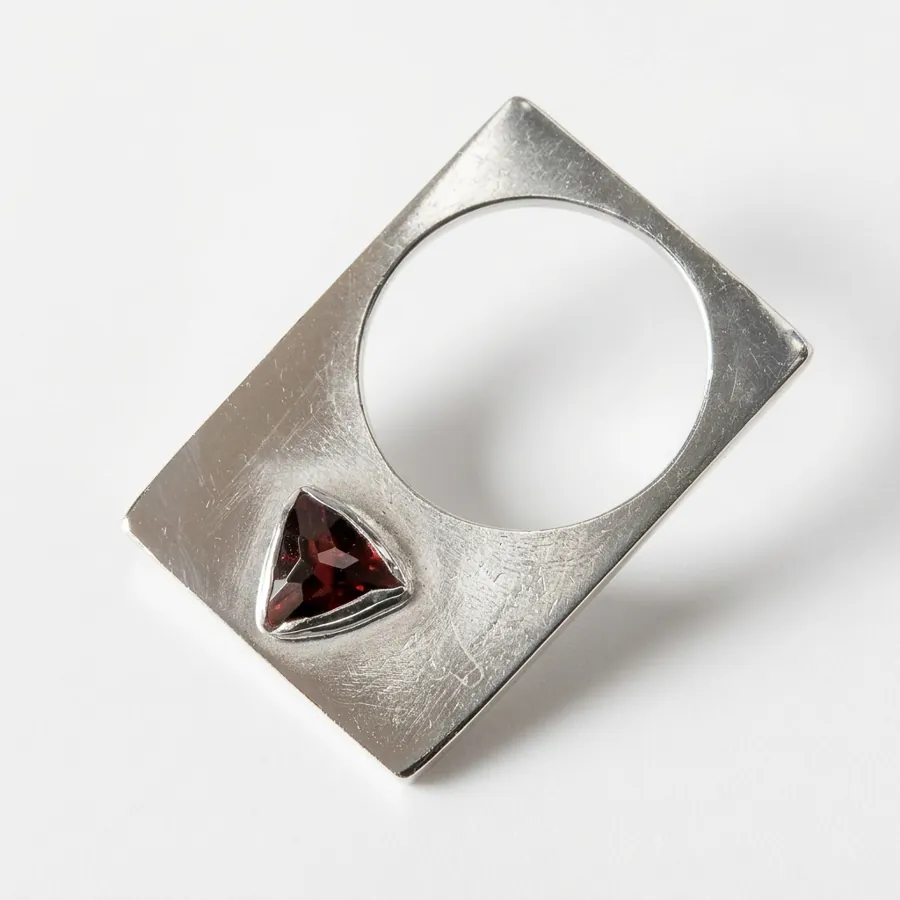
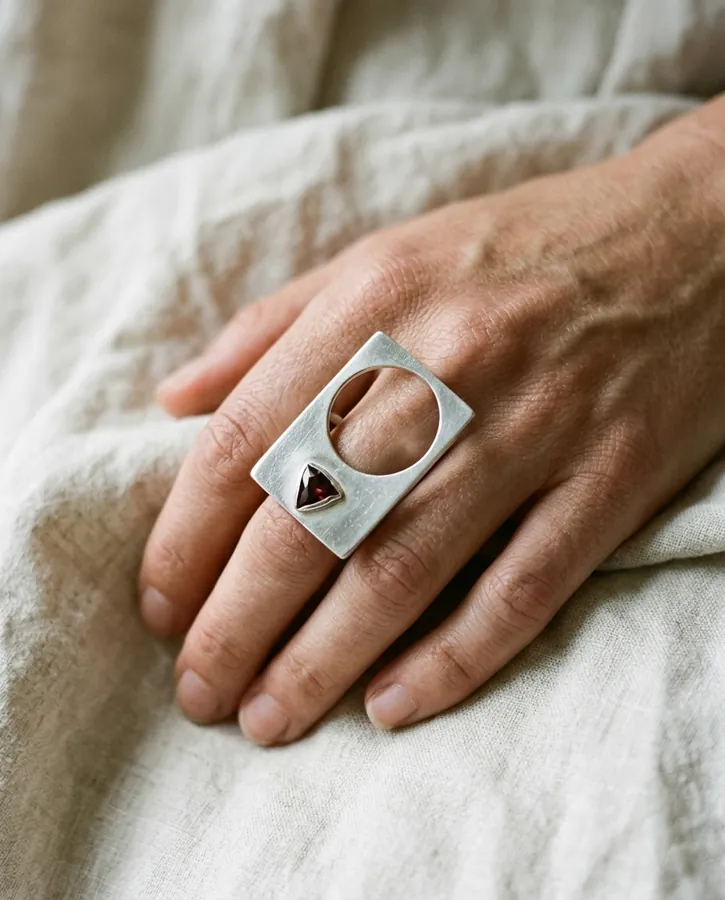
This test starts from a real photo: a flat silver ring with a round cut-out and a triangular faceted garnet. On white, the shape, the opening, the scratches in the metal and the colour of the garnet stayed very close to the original, and the grey backdrop became a clean white. In the styled scene the ring sits on a hand over linen: the mood sells better, but the piece is redrawn at a smaller scale, so the stone shows less detail. Always compare the facets and proportions with the real piece before you publish.
How to do it in 3 steps
- Shoot near a window in indirect daylight, no flash, on a white sheet or light card. Keep the whole piece in frame with some margin, from the front or at a three-quarter angle. Photographing a pendant or ring lying flat? The Flat lay module can also work.
- Open the Product photo module, upload the picture and type a short instruction, for example: “pure white background, very soft contact shadow, shiny silver without blown-out highlights”. Without an instruction, the module applies its built-in professional setup.
- Generate at 1K first (20 credits) to check the result, then at 2K or 4K (40 credits) for the version you publish. Download the image and add it to your listing.
What to check on a piece of jewelry
Jewelry is all about details. Because the image is redrawn from your photo, check these points one by one before publishing.
- Facets and stone size: their number, size and orientation should match the real stone, not just look similar.
- Hallmarks and engravings: a tiny hallmark can fade or be reinvented. Show it in a real close-up rather than in the generated image.
- Metal and stone colour: silver, gold or rose gold must stay true to the piece, and so must the exact shade of the stone.
- Proportions: band thickness, chain length, pendant size. In a worn scene, make sure the scale gives a correct idea of the real size.
- Intentional flaws: hammering, patina or scratches on a handmade piece are part of its signature. Check they have not been smoothed away.
A ready-to-copy instruction
Here is a structured instruction to paste into the Product photo module. Adapt the piece and the setting:
Professional product photograph of the exact piece of jewelry in the reference image.
Preserve the product exactly: shape, opening, stone and facets, setting, scratches and patina of the metal, colors. Do not redesign it, add nothing, no invented text or engraving.
Scene: pure white background, a faint contact shadow under the piece.
Lighting: one large soft source from the left, controlled metal reflections, true stone color.
Camera: three-quarter view, piece centered, sharp across its whole surface, margin all around.
What does a collection cost?
There is no subscription: a 1K image costs 20 credits and a 2K or 4K image 40. Packs cost €4.99 for 500 credits, €9.99 for 1,500 and €24.99 for 5,000, which puts a 1K image between €0.10 and €0.20. Purchased credits never expire. For a small collection, count one white-background image and one styled scene per piece, both at 2K.
Good to know
- One image at a time: no batch processing, no API and no integration with Etsy, Shopify or any other shop. You download each image and upload it yourself.
- Badge and watermark: the first 2 free images carry a small badge, the following ones a more visible watermark. It is removed for good after your first credit purchase.
- The image is redrawn: for jewelry, keep real close-ups (hallmark, clasp, setting) next to the generated visuals, so buyers see the piece as it really is.
- Privacy: your data is stored in France and your photos are never used to train AI models. NiceLook is published by waitech france.
When you sell online, always show the product faithfully: each platform's rules are summarised in our guide to AI images and marketplaces.
100 free credits on sign-up, no credit card, no subscription.
Try NiceLook for free →100 free credits (5 images) · no subscription · packs from €4.99
FAQ
How do I make a jewelry photo on a white background with AI?
Photograph the piece near a window, upload the picture to NiceLook's Product photo module and ask for a pure white background with a soft shadow. Test at 1K for 20 credits, then generate at 2K or 4K for the version you publish.
Does AI keep the facets and hallmarks of my jewelry?
Not guaranteed. The image is redrawn from your photo: main facets stay close, but a tiny hallmark or engraving can fade. Check every detail and keep real close-up photos.
How much do jewelry photos cost on NiceLook?
A 1K image costs 20 credits and a 2K or 4K image 40 credits. Packs run from €4.99 for 500 credits to €24.99 for 5,000, with no subscription. Sign-up includes 100 credits, or 5 images at 1K.
Can I process my whole jewelry catalogue at once?
No. NiceLook creates one image at a time, with no batch processing or API, and it does not connect to Etsy or Shopify. You download each image and upload it yourself.